Best AI Calorie Counter Apps in 2026 (Tested & Ranked)
Finding the best AI calorie counter app used to mean settling for whichever database had your exact brand of yogurt. That changed fast. Across 2025 and into 2026, a new wave of trackers learned to read a photo of your plate, estimate portions, and log the macros in a couple of seconds — no scrolling, no barcode hunting. The result is that calorie tracking finally got fast enough that people actually stick with it.
But "AI-powered" is now a marketing sticker on almost every app in the App Store, and the quality varies wildly. Some genuinely recognize food and estimate portions; others just bolt a chatbot onto the same old manual database. We spent real time logging real meals to separate the two. Here's what actually works in 2026, and how the leading apps compare.
What makes an AI calorie counter actually good
After enough logging, the apps that earn a permanent spot on your home screen all share four traits:
- Accuracy that's honest about itself. No photo tool nails calories to the gram, and the good ones don't pretend to. What matters is whether the estimate lands in a useful range and whether the app makes its assumptions visible so you can sanity-check them.
- Speed. If logging a meal takes longer than eating it, you'll quit by week two. The best apps turn a photo into a logged entry in seconds.
- Multiple ways to log. A photo is great for a plated meal, but voice is faster for "two eggs and a black coffee," and a barcode is unbeatable for packaged food. Strong apps let you pick the right tool per meal.
- Easy correction. AI will occasionally guess wrong — call grilled chicken "fried," or read a small portion as a large one. The difference between a frustrating app and a great one is how quickly you can tap in and fix the number.
That last point matters more than people expect. An estimate you can adjust in two taps is worth far more than a "precise" number you had to build by hand from a database search.
How we tested
We logged a week of ordinary meals — home-cooked dinners, restaurant plates, packaged snacks, and a few deliberately tricky mixed dishes like stir-fries and curries where oil and sauce hide a lot of calories. For each meal we captured the AI's first-pass estimate, then compared it against the actual ingredients and quantities we knew were on the plate. We also timed how long a typical log took from opening the app to a saved entry, and noted how painful it was to correct a wrong guess.
We're not claiming lab precision. The goal was the thing that actually decides whether an app helps: is the number close enough to guide your eating, and is the app fast and forgiving enough that you'll keep using it next month?
The best AI calorie counter apps in 2026
1. Voidpen — best overall
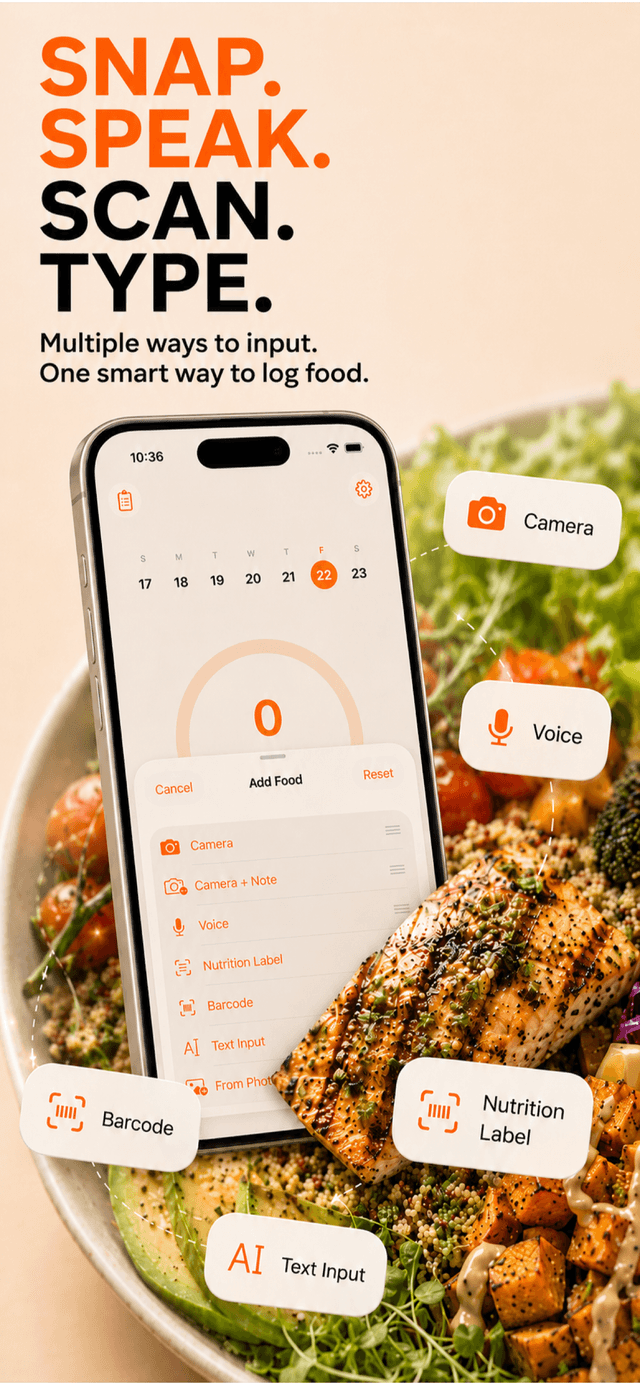
Voidpen is an iOS-only AI calorie tracker built around the idea that the fastest log is the one you'll actually do. You can log a meal three ways: snap a photo and let the AI identify the food and estimate portions, speak it ("a bowl of oatmeal with blueberries and almond butter"), or scan a barcode or type it for packaged items. In testing, photo estimates typically landed within about ±15% of our reference numbers — and crucially, every estimate is fully editable, so when the AI under-read a generous pour of olive oil, fixing it took two taps.
Two things set it apart. First, the built-in AI Coach you can actually chat with — ask it why an estimate came out the way it did, how to hit a protein target, or what to swap to stay under your calories for the day. Second, it syncs weight and body data with Apple Health, so your trend data lives alongside the rest of your health picture instead of in a silo.
Pros: Fastest multi-method logging, genuinely useful Coach, honest and editable estimates, Apple Health sync. Cons: iOS only (no Android or web), and like every photo tracker it needs your help on heavily mixed dishes. Full features are behind an App Store subscription.
2. Cal AI
Cal AI helped popularize the photo-first approach and remains a solid pick for snap-and-log tracking. Its core flow — photograph the plate, get an estimate — is clean and quick, and as of 2026 it leans hard into the AI-camera experience.
Pros: Simple, photo-first, low-friction onboarding. Cons: Less flexible than apps that also do voice and a deep barcode database; as with all photo tools, mixed dishes need manual correction.
3. MyFitnessPal (AI photo feature)
MyFitnessPal is still the database giant, and as of 2026 it has layered AI photo logging on top of its enormous food catalog. If you already live in MFP and want a faster way to log, the photo feature is a reasonable add-on, and the barcode database is hard to beat.
Pros: Massive food and restaurant database, mature ecosystem, strong barcode coverage. Cons: The experience can feel heavy and ad-laden, and several of the better features — including parts of the AI tooling — sit behind a paid tier as of 2026. If your main complaint is manual search friction, see our roundup of MyFitnessPal alternatives.
4. Lose It! (Snap It)
Lose It!'s "Snap It" feature has offered photo-based logging for years, and the broader app is a friendly, approachable weight-loss tracker with solid goal-setting.
Pros: Beginner-friendly, good goal and budget framing, established track record. Cons: Photo recognition is helpful but not its strongest feature; deeper functionality is gated behind a paid plan as of 2026.
5. Cronometer
Cronometer isn't really an AI-photo app — it's the choice for people who care about micronutrients, not just calories. Its database is meticulously sourced, and it tracks vitamins and minerals in detail that most apps ignore entirely.
Pros: Unmatched micronutrient depth, high data quality, great for people with specific nutritional needs. Cons: More manual and more clinical; not the app to grab if your priority is logging a meal in five seconds from a photo.
How accurate is photo calorie counting?
This is the question that decides whether the whole category is worth your time, so it deserves an honest answer. Photo-based estimates generally land within roughly 10–20% of a meal's true calories — comparable to, and often better than, a person eyeballing a plate. They're strongest on clearly plated, recognizable foods and weakest on mixed dishes where cooking oils, sauces, and dressings hide calories the camera can't see.
The practical takeaway: a number that's within 15% every day, that you'll actually log, beats a "perfect" number you abandon after two weeks. We go deep on the science in can AI really count calories from a photo, including how to nudge estimates to be more reliable.
Which app should you choose?
- Want the fastest, most flexible everyday tracker on iPhone? Voidpen. Photo, voice, and barcode in one place, an editable estimate every time, and a Coach to answer the "why."
- Want a dead-simple, photo-only experience? Cal AI is a clean pick.
- Already deep in a massive database and just want photo logging on top? MyFitnessPal.
- New to tracking and want gentle goal-setting? Lose It!.
- Obsessed with micronutrients, not just calories? Cronometer.
There's no single "best" for everyone — but if your goal is to log consistently without it becoming a chore, an AI tracker that's fast and forgiving will outlast a precise one that's tedious.
That tedium is exactly why so many people quit tracking in the first place. If that's you, read why tracking feels tedious — and then pick the app that removes the friction instead of adding to it.