5 Best MyFitnessPal Alternatives for Effortless Tracking (2026)
If you've landed here, you've probably already decided you want a MyFitnessPal alternative — you just want to know which one is actually worth switching to. MyFitnessPal earned its place as the default calorie tracker by building an enormous food database, but in 2026 a lot of people find the everyday experience grinding: searching for the right entry among a dozen near-duplicates, scanning barcodes one at a time, and bumping into features that now sit behind a paywall.
The good news is that the category has moved on. A new generation of trackers logs food from a photo, your voice, or a quick barcode scan — turning what used to be a minute of database wrangling into a few seconds. Below are five of the best MyFitnessPal alternatives, what each one does well, and where it falls short, so you can pick the one that fits how you actually eat.
Why people look for a MyFitnessPal alternative
The complaints are consistent, and most of them come down to friction:
- Tedious manual entry. Logging means typing a food name, wading through results, picking the "right" one, and setting a serving size. Do that for every item, every meal, and the chore adds up.
- Barcode-by-barcode logging. Scanning works for packaged food, but it does nothing for a home-cooked plate or a restaurant meal — exactly the meals most worth tracking.
- Ads and clutter. The free experience can feel busy and interrupted.
- Paywalled features. As of 2026, several capabilities people consider core have moved into a paid tier, which leaves the free app feeling thinner than it used to.
None of this means tracking doesn't work. It means the method is the problem. If logging is fast and forgiving, people stick with it — which is the whole reason the alternatives below exist. We dig into that dynamic in why calorie tracking feels tedious.
What to weigh before you switch
Before picking from the list below, it helps to know which of MyFitnessPal's weaknesses bothers you most — because each alternative fixes a different one:
- If logging speed is your problem, prioritize an app that logs from a photo or your voice. This is the single biggest quality-of-life upgrade, because it removes the search-type-scroll loop entirely.
- If you don't trust the numbers, prioritize data quality. Crowd-sourced databases drift over time as users add duplicate and sloppy entries; a vetted database fixes that.
- If your targets feel arbitrary, prioritize an app that adapts your calorie and macro goals to your real-world results instead of leaving you on a number you guessed at month one.
- If you're early in your journey, prioritize gentle goal-setting and a friendly interface over raw power.
Most people overweight database size and underweight friction. A bigger database doesn't help if you dread opening the app. Keep that in mind as you read.
The 5 best MyFitnessPal alternatives
1. Voidpen — best for ditching the database search
Voidpen is an iOS AI calorie tracker built specifically to kill the part of MyFitnessPal people hate most: the search. Instead of typing and scrolling, you photograph the plate, speak the meal, or scan a barcode — and the AI identifies the food and estimates portions for you. A meal that used to take a minute of searching logs in seconds.
The estimates aren't a black box. In practice they land within about ±15% of the real numbers, and every one is editable, so correcting a guess takes a couple of taps rather than a rebuild from scratch. There's also an AI Coach you can chat with about your day's macros, and the app syncs weight and body data with Apple Health so your trend lives with the rest of your health data.
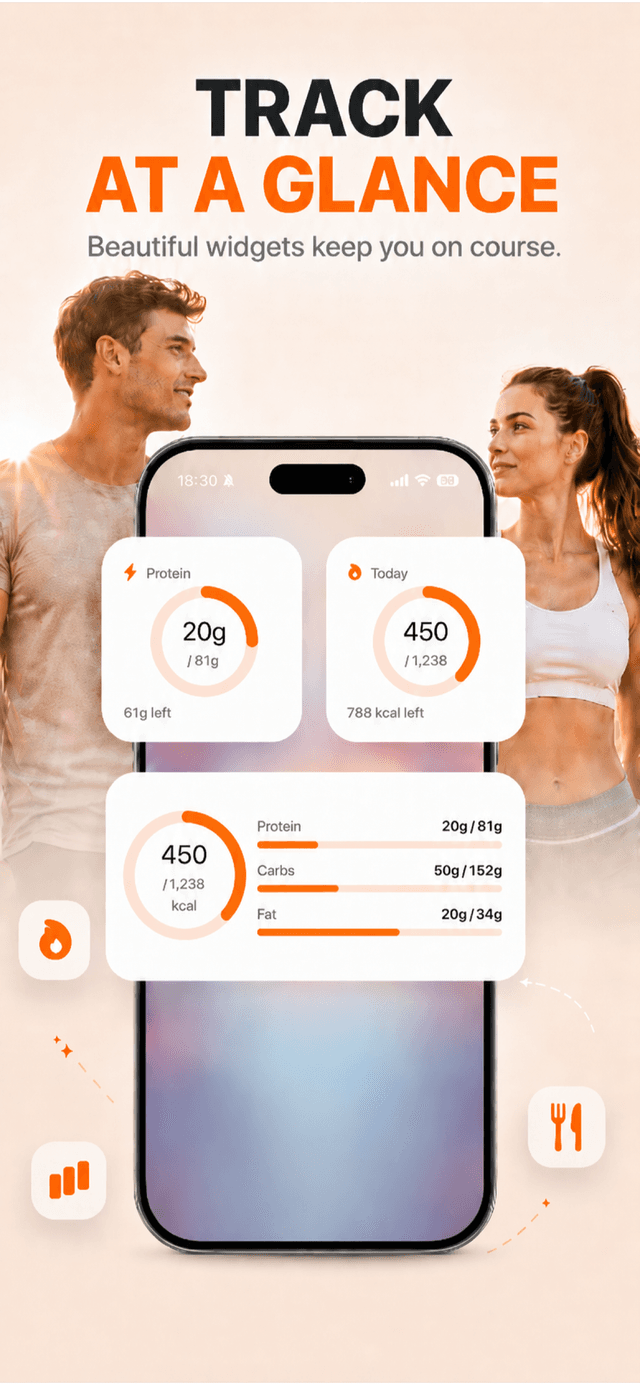
Pros: Photo and voice logging remove the database search entirely; fast, editable estimates; built-in Coach; Apple Health sync. Cons: iOS only as of 2026; mixed dishes still need a quick manual correction; full features need an App Store subscription.
2. Cronometer — best for data quality and micronutrients
If your frustration with MyFitnessPal is that its crowd-sourced database is full of unreliable entries, Cronometer is the answer. Its food data is carefully sourced, and it tracks vitamins and minerals in detail almost no other app matches.
Pros: High-quality, vetted database; deep micronutrient tracking; great for specific dietary needs. Cons: Still largely manual — it solves data quality, not logging speed; the interface is more clinical than friendly.
3. Lose It! — best for gentle, goal-focused tracking
Lose It! is the friendly, approachable alternative. Its calorie-budget framing makes goals feel manageable, and its "Snap It" feature offers photo-based logging if you want to skip some manual entry.
Pros: Beginner-friendly; clear goal and budget framing; photo logging available. Cons: Photo recognition is helpful but not the core strength; deeper features sit behind a paid plan as of 2026.
4. Cal AI — best for a pure photo-first experience
Cal AI helped make snap-and-log mainstream. If you want the simplest possible "photograph your plate, get an estimate" flow with minimal setup, it's a clean choice.
Pros: Very simple; photo-first; quick to start. Cons: Less flexible than apps that also offer voice and a deep barcode database; mixed dishes need correction like any photo tool.
5. MacroFactor — best for adaptive macro coaching
MacroFactor takes a different angle: it's built for people who want their calorie and macro targets to adapt to real-world results. It uses your weight and intake trends to adjust your targets over time, which is a smarter approach than a static number that never changes.
Pros: Adaptive targets based on your actual data; strong for committed macro trackers; clean, no-nonsense design. Cons: Logging is still fairly manual; it's a subscription product aimed at people who want precision over speed.
How to switch without losing momentum
The biggest risk in switching trackers is a gap — a few days where you stop logging "until the new app is set up" and never restart. A few tips to avoid that:
- Don't try to import years of history. Your past data isn't what drives results; today's log is. Start fresh and just log your next meal in the new app.
- Set your goal once, then trust it. Enter your target calories or macros on day one and don't fiddle. Consistency beats fine-tuning. If you're not sure what your target should be, our guide on how many calories to lose weight covers the math.
- Pick the logging method per meal. Photo for plated food, voice for simple stuff, barcode for packages. The whole point of moving on is that you no longer have to do it one tedious way.
- Give it a full week. New habits feel awkward for a few days. If the app is genuinely faster, by day seven logging will feel automatic.
The right MyFitnessPal alternative depends on what frustrated you in the first place. If it was data quality, Cronometer. If it was rigid targets, MacroFactor. But if it was the sheer friction of searching and typing every meal, an AI tracker that logs from a photo will change how tracking feels. For the full landscape, see our tested roundup of the best AI calorie counter apps.