5 Best Cal AI Alternatives for Accurate Photo Calorie Tracking (2026)
Cal AI deserves real credit: it made photo-first calorie tracking mainstream and proved that millions of people would rather photograph a plate than search a database. If you're reading this, you probably agree with the idea — you just want an app whose numbers you can trust, or one that handles the meals a single photo can't.
The good news is that snap-and-log is no longer one app's trick. A whole generation of trackers now logs food from a photo, your voice, or a barcode — and several of them fix the specific things Cal AI users complain about most. Here are five worth switching to, what each does well, and where each falls short.
Why people look for a Cal AI alternative
To be fair: Cal AI is popular and broadly well-reviewed. But read through its critical reviews and the same themes repeat, almost word for word:
- Estimates you can't quite trust. Photo AI is genuinely hard, and every app gets mixed dishes wrong sometimes. The frustration users report is less the miss itself and more confidently wrong numbers — a handful of grapes scored like a dessert, or ingredient macros that don't add up when you tap into them.
- Correcting a bad guess is clunky. When the AI misreads a plate, you want a two-tap fix. If editing an estimate is harder than logging the meal manually would have been, the time savings evaporate.
- One input method. A photo is perfect for a plated meal. It's the wrong tool for a protein shake you're already drinking, a packaged snack with a barcode, or "same breakfast as always." Photo-only apps make every meal a photo problem.
- Account and access hiccups. A tracker only works if it opens. Reviews citing lockouts and unresponsive support are a reminder that reliability is a feature, too.
None of this means photo tracking is a gimmick — the research says it works well when estimates are editable and verifiable. We dig into the accuracy question in can AI count calories from a photo?
What to weigh before you switch
Each alternative below fixes a different complaint, so know which one is yours:
- If you don't trust the numbers, prioritize apps where every estimate is editable and shows its work — you want to verify, not believe.
- If photos don't fit every meal, prioritize an app with more ways in: voice, barcode, nutrition-label scanning, quick re-log of frequent meals.
- If you want your data to outlive the app, prioritize Apple Health sync, so your weight and nutrition history isn't trapped.
- If you're optimizing a cut or bulk, consider whether you've outgrown snapshot estimates and want adaptive targets instead.
The 5 best Cal AI alternatives
1. Voidpen — best for editable estimates and more ways to log
Voidpen keeps the part of Cal AI people love — point your camera at the plate, get calories and macros in seconds — and fixes the part they don't: every estimate is editable, with serving sizes you can adjust in a couple of taps, so a wrong guess is a five-second correction instead of a leap of faith. In practice estimates land within about ±15% of the real numbers, and you can always see and tune what the AI decided.
It's also not photo-only. You can speak a meal ("two eggs and a banh mi"), scan a barcode, or photograph a nutrition label — whichever is fastest for that meal. An AI Coach chats with you about your day's macros, and everything syncs with Apple Health so your data stays yours.
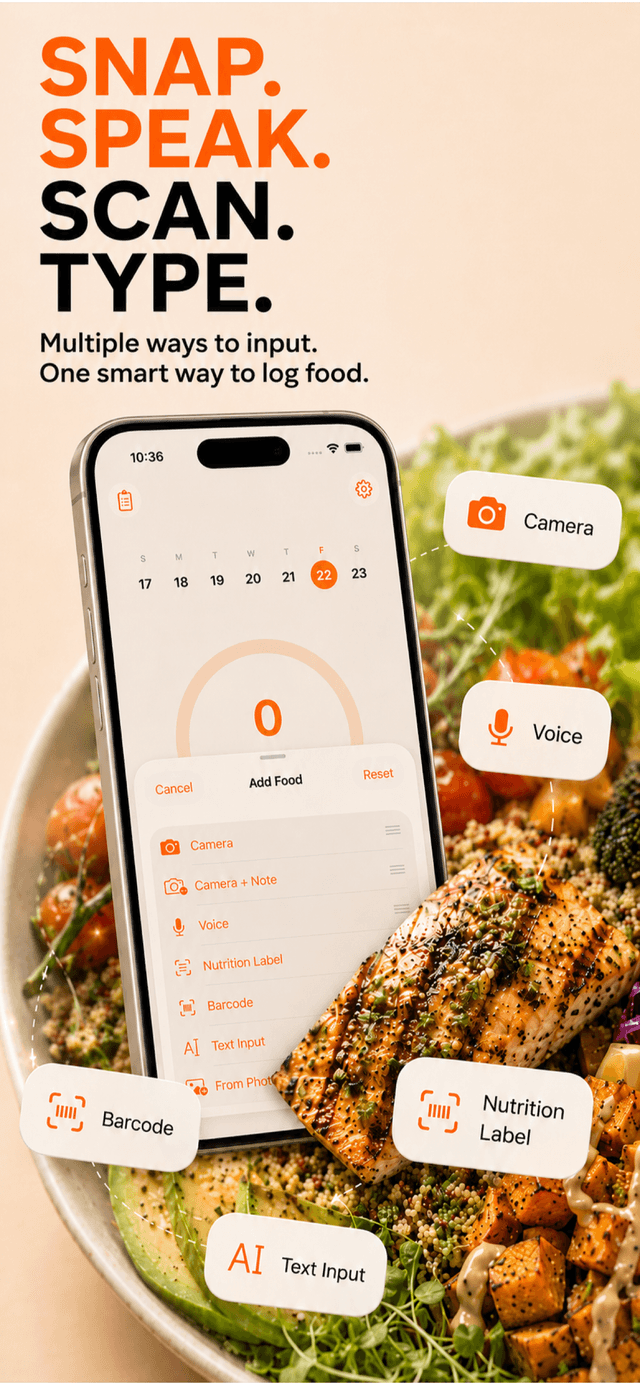
Pros: Photo, voice, and barcode input; estimates are transparent and editable; AI Coach; Apple Health sync. Cons: iOS only as of 2026; mixed dishes still benefit from a quick check; full features need an App Store subscription (with a free trial to verify the accuracy yourself first).
2. MyFitnessPal — best if you want the biggest database as a safety net
The opposite philosophy: instead of trusting AI vision, MyFitnessPal leans on an enormous food database built over 15+ years. When you need an exact branded item — a specific protein bar, a chain-restaurant burrito — it's usually in there.
Pros: Unmatched database coverage; meal scan has improved; huge community. Cons: The everyday experience is still search-type-scroll; ads and paywalled features on the free tier. We covered the friction in detail in our MyFitnessPal alternatives guide — it cuts both ways.
3. MacroFactor — best if your real question is "are my targets right?"
If you've been burned by AI estimates, MacroFactor's answer is: stop chasing perfect logging and let the algorithm correct for it. It adjusts your calorie and macro targets weekly based on your actual weight trend, so consistent small logging errors wash out.
Pros: Adaptive targets based on real results; forgiving of estimation error by design; serious, no-nonsense tool. Cons: Logging itself is still fairly manual; subscription-only; more app than a casual tracker needs.
4. Lose It! — best for a gentler, budget-style reset
Lose It! frames everything as a daily calorie budget, which makes the habit feel manageable rather than clinical. Its "Snap It" photo logging covers the snap-and-log basics, with a friendlier on-ramp than most.
Pros: Beginner-friendly; clear budget framing; photo logging included. Cons: Photo recognition is a feature, not the core strength; deeper tools sit behind the paid tier as of 2026.
5. Cronometer — best for people who now want maximum data quality
If Cal AI taught you that you do care about what's in your food, Cronometer is the deep end: a carefully vetted database with micronutrient detail almost nothing else matches. It's the choice for "I want numbers I'd defend to a dietitian."
Pros: Vetted, high-quality data; tracks vitamins and minerals in depth; great for medical or athletic precision. Cons: Largely manual logging — it solves trust, not speed; the interface is more lab than lifestyle.
How to switch without losing your streak
- Start fresh today. Don't wait to export history — your next meal matters more than your last hundred. Log one meal in the new app and the switch has already happened.
- Re-verify your targets. Different apps compute goals differently. Take two minutes to sanity-check your daily calories — our guide on how many calories to lose weight has the math.
- Use the trial to test your meals. Photograph the dishes you actually eat every week — including the messy, mixed ones — and check the estimates against labels you know. That's the only accuracy test that matters.
- Pick the input per meal. Photo for plates, voice for simple things, barcode for packages. The point of leaving a photo-only app is that you never have to force the wrong tool again.
The right Cal AI alternative depends on what broke your trust. If it was rigid targets, MacroFactor. If it was database gaps, MyFitnessPal or Cronometer. But if you love photo logging and just want estimates you can see, verify, and fix — plus voice and barcode for everything a photo can't catch — that's exactly the gap Voidpen was built to fill. For the wider field, see our roundup of the best AI calorie counter apps.