How to Count Calories by Taking a Photo of Your Food
The fastest way to count calories from a photo is exactly what it sounds like: point your phone at your plate, take the shot, and let an AI do the identifying and the math. No scrolling through a database, no hunting for the right brand of yogurt, no weighing every ingredient. A meal that used to take a minute or two to log now takes about five seconds. This guide walks you through the whole flow — how to take the photo, what the AI is actually doing, and how to fix the estimate when it's a little off — so your numbers are both fast and trustworthy.
The mechanics are simple, but a few small habits make a real difference in how accurate the result is. Let's go step by step.
Step 1: Take a clear photo
The quality of your estimate starts with the quality of your photo. The AI can only count what it can see, so give it a clean, well-lit look at the whole meal.
- Light it well. Natural light is ideal. Shadows and dim, yellow indoor light make food harder to recognize, which is the first thing that can throw off a number.
- Get the whole plate in frame. Capture everything you're about to eat in one shot. If half the food is cropped out, half the calories go uncounted.
- Shoot from a slight angle, not dead overhead. A roughly 45-degree angle gives the AI depth cues — it can see the height of a pile of rice or the thickness of a steak — which makes portion estimates noticeably better than a flat top-down photo.
- Give it something for scale. The plate edge, a fork, or your hand in frame helps the AI judge how big the portion really is.
- Separate items when it's easy. Foods that are piled on top of each other are harder to tell apart and size individually. A little spacing helps.
None of this needs to be fussy. A normal photo of your normal plate in normal light is usually plenty — these are just the nudges that turn a good estimate into a great one.
Step 2: Let the AI identify the food
Once you snap the photo, a lot happens in the second or two before the result appears. Behind the scenes, the app runs through three quick stages:
- It recognizes the food. A vision model looks at the image and identifies what's on the plate — "scrambled eggs," "sourdough toast," "avocado." It's been trained on enormous sets of food images, so it handles common meals well and can usually pick apart several items in a single shot.
- It estimates the portion. This is the hard part. The app judges how much of each food is there using visual cues — size relative to the plate, depth, and typical serving sizes. A photo is two-dimensional, so this step is where most of the uncertainty lives.
- It looks up the nutrition. With the food identified and a portion estimated, the app pulls calorie and macro values from a nutrition database and adds everything into a total.
You don't have to think about any of this — you just see the finished entry. But knowing the steps helps you understand why an estimate might need a tweak, which is exactly what the next step is for. If you want the full picture of what's happening under the hood and how reliable it is, we cover it in can AI really count calories from a photo.
Step 3: Check and adjust the estimate
Here's the mindset that makes photo logging work: treat the AI's number as a strong first draft, not a final answer. A well-built photo tracker typically lands within about ±15% of a meal's true calories, and in Voidpen every estimate is fully editable — so the moment something looks off, you fix it in a couple of taps.
Give the result a two-second sanity check:
- Did it identify the food correctly? If it called grilled chicken "fried," switch it.
- Is the portion right? This is the most common thing to adjust. If it logged one cup of rice but you ate closer to a cup and a half, bump the amount up. Editing the quantity closes most of the gap on its own.
- Did anything invisible get missed? The camera can't see the tablespoon of oil your vegetables were cooked in, or the dressing soaked into a salad. If you know it's there, add it. Hidden fats are calorie-dense and they're the classic blind spot.
That quick edit is what separates a useful log from a misleading one. You're never stuck with a number you don't agree with, and over time you'll learn which of your usual meals the AI nails and which ones need a nudge.
Step 4: Log other meals just as fast
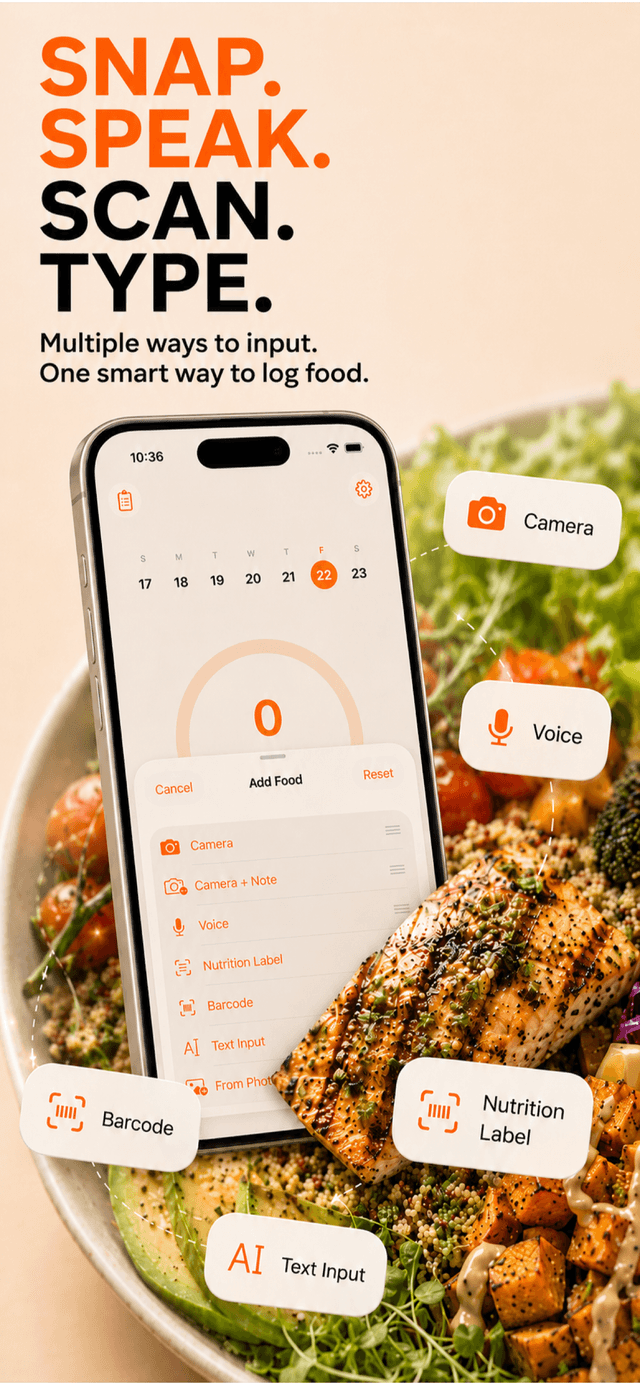
A photo is perfect for a plated meal, but it isn't always the fastest tool — and the whole point is to keep logging effortless no matter what you're eating. Voidpen gives you a few ways to capture a meal so you can pick the quickest one for the moment:
- Voice. Just say it: "a bowl of oatmeal with blueberries and a spoon of peanut butter." Speaking is often faster than photographing, especially for simple meals or things you've already started eating.
- Text. Type a quick description when you can't talk or snap — "two eggs and a black coffee" — and the AI parses it the same way.
- Barcode. For packaged food, scan the barcode for an exact, label-accurate entry. Nothing beats a barcode for a protein bar or a bag of chips.
The right tool depends on the meal: photo for a restaurant plate, voice for a quick snack, barcode for anything with a wrapper. Having all of them in one place is what keeps the habit from breaking on a busy day.
Tips to count calories from a photo accurately
A short checklist to keep your numbers honest without slowing you down:
- Photograph before you eat, not after. It's hard to estimate half a plate of food.
- Shoot from an angle with the whole plate in frame and something for scale.
- Always edit the portion when it's off — it's the single highest-impact correction.
- Add the invisible calories — cooking oil, butter, dressings, syrups in your coffee.
- Log mixed and saucy dishes carefully. Curries, stir-fries, and casseroles hide a lot of oil and sauce the camera can't see, so they need the most help from you.
- Don't chase perfection. A consistent estimate within 15% that you actually log beats a flawless number you skip because it was too much work. Awareness and consistency are what move the scale.
That last point is the heart of it. The reason most people quit calorie counting isn't bad math — it's friction. Photo logging removes enough of that friction to make tracking something you'll actually keep doing. If counting calories has burned you out before, read why calorie tracking feels tedious for the deeper fix. Once logging takes five seconds, sticking with it stops being the hard part.